Uploading receipts
Did you pay for something for the production out of your own pocket, such as a hotel, transport, parking or materials? Then you upload the receipt in the Additional receipts section. vortex reimburses the amount 1:1, with no deductions. The per diems for breakfast, main meal and kilometres don’t go here; you enter them on the day card.
How to upload a receipt
Section titled “How to upload a receipt”-
In the rapport, scroll to Additional receipts. The section sits below the work days.
-
Tap Choose file and select a photo (JPG or PNG) or a PDF. You can select up to 10 files at once, each up to 10 MB. On a computer you can also drag files onto the dashed area.
-
Wait a moment. While vortex reads the receipt, the area shows the file name with “is being read …”. Multi-page PDFs can take longer.
-
Check the new card. If a file contains several receipts, for example a scan, vortex creates a separate card for each.
What to check on the card
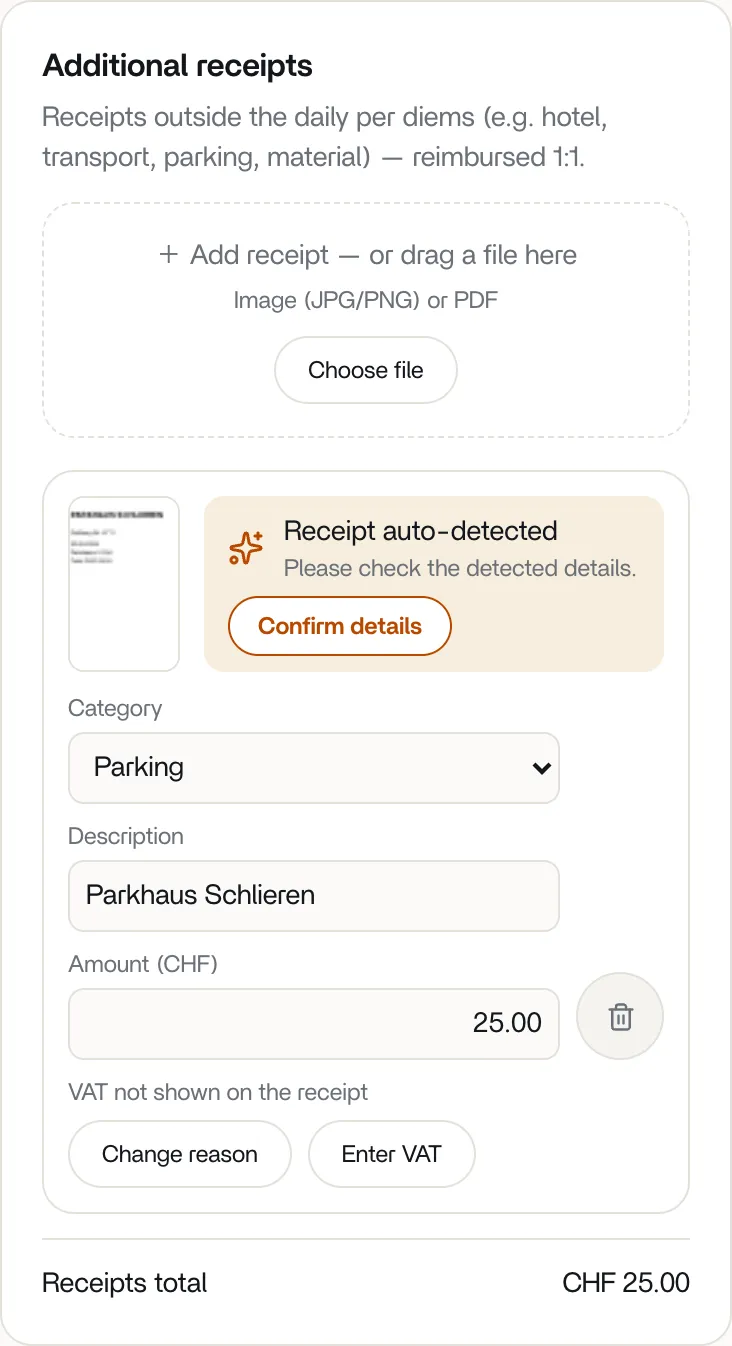
Section titled “What to check on the card”vortex fills in what it recognises on the receipt: Category (Hotel, Transport, Parking, Material, Meals or Other), Description and Amount (CHF). Change anything that’s wrong. If your amount differs from the one that was read, vortex asks whether you really want to change it. vortex saves changes automatically. Tapping the preview image opens the original in a new tab.
The banner at the top of the card shows how sure vortex is:
- Receipt auto-detected: compare the details with the receipt. If everything is right, tap Confirm details. If several receipts are unchecked, there is also Mark all as checked.
- Check receipt: vortex couldn’t read the amount. Enter the description and amount yourself.
- Details checked automatically: vortex has recalculated the amounts and VAT. You don’t need to do anything.
- Details checked: the details are confirmed.
Confirming is optional: you can submit with unchecked receipts too.
Deleting a receipt
Section titled “Deleting a receipt”Tap the trash icon Delete receipt and confirm the question Really delete this receipt? with Delete. You can only add and delete receipts while the rapport is a draft. After you submit, neither is possible; after the production team sends the rapport back, both are possible again.
What does vortex pay out?
Section titled “What does vortex pay out?”The sum of all receipts is shown at the bottom of the section as Receipts total. In the Pay preview it appears as Expenses – receipts and is added to the Total payout without deductions. How the total is made up is explained in How vortex calculates your pay.